Monday, 28 January 2013

How to install AOKP Jelly Bean ROM for the Galaxy S3 I747


banner-galaxy-s3-i747-i747m-aokp-rom-121220
AOKP is a well-known and well-respected ROM in the Android community for a variety of reasons. One of which is the ROM’s many customized features that involve performance enhancements. Now, thanks to the efforts of XDA Developers members Task650 & Ktoonsez, AT&T and Rogers Galaxy S3 owners can enjoy an unofficial version of the AOKP ROM.
Task650 & Ktoonsez have been working on creating a stable and workable version of AOKP. This ROM is also being actively developed and updated by the developers, so expect more features and fixes in their next update. The recent update comes with new animation options, CyanogenMod’s Chronus clock and weather widget, Navigation Bar color options, a few fixes from the older version, and more.
This guide shows you how to install AOKP Jelly Bean ROM for the Galaxy S3 I747.

Warning

  • The instructions in this guide are intended for use with the AT&T Samsung Galaxy S3 SGH-I747 or Rogers Samsung Galaxy S3 SGH-I747M. Applying these instructions on another device or model may produce undesired outcomes.
  • The information in this guide is provided for instructional and educational purposes only. There is no guarantee that these instructions will work under your specific and unique circumstances.
  • Use these instructions at your own risk. We shall not hold any responsibility or liability for whatever happens to you or your device arising from your use of the info in this guide.
  • Read and understand the whole guide first before actually performing the instructions.

Requirements

  • AT&T Samsung Galaxy S3 SGH-I747 or Rogers Samsung Galaxy S3 SGH-I747M withClockworkMod Recovery installed. .
  • Download the following:
    • AOKP Jelly Bean (aokp_JB_4.2_d2att-ota-eng.task650-1.17.2013.zip, md5sum: dc36f2b2ce9cd11b35420115216d0076)
  • Backup all personal data on your phone to make sure you have a copy of your personal data (e.g., contacts, SMS, MMS, Internet settings, Wi-Fi passwords, and the like) in case the procedure in this guide erases such data.
  • Make sure that your phone’s battery power is at least 50% to avoid interruption due to power loss that may cause damage to your phone.

Instructions

  1. Copy aokp_JB_4.2_d2att-ota-eng.task650-1.17.2013.zip and gapps-4.2-jb-12.19.2012-signed.zip to your phone’s internal SD card.
  2. Turn off your phone.
  3. Boot the phone into ClockworkMod Recovery by holding the Volume Up, Power, and Home buttons.Once in Recovery Mode, use the Volume keys to navigate through options and the Power button to select.
    • Create a NANDroid Backup. Go to Backup and Restore > Backup.
    • Select Wipe Data/Factory Reset > Yes.
    • Select Wipe Cache Partition > Yes.
    • Select Advanced > Wipe Dalvik Cache > Yes.
    • Select Mounts and Storage > Format /system > Yes.
    • Select Install ZIP from SD Card > Choose ZIP from SD Card > locate and select aokp_JB_4.2_d2att-ota-eng.task650-1.17.2013.zip > Yes.
    • Select Install ZIP from SD Card > Choose ZIP from SD Card > locate and select gapps-aokp-JB-10.12.2012.zip > Yes.
    • Select Go Back > Reboot System Now.
    Congratulations! You just flashed the unofficial AOKP Jelly Bean preview build to the AT&T Samsung Galaxy S3 SGH-I747 or the Rogers Samsung Galaxy S3 SGH-I747M.

    How to flash Android 4.1.2 Jelly Bean XXELLC for the Galaxy S3 I9300


    banner-galaxy-s3-i9300--jellybean-official-i9300xxellc-121220
    Still waiting for your Jelly Bean update for the Samsung Galaxy S3 GT-I9300? Wait no more because the latest software version XXELLC of Android 4.1.2 Jelly Bean for the Galaxy S3 I9300 has been officially released for the Spain region, which also includes Austria, Belgium, France, Germany, Hungary, Italy, and the United Kingdom.
    This official Android 4.1.2 release reportedly packs all the features you’ve been waiting for in Jelly Bean: Multi-View, Page Buddy, a new Gallery App, Smart Rotation, Paper Artist, and the Group Cast app to name a few.
    Enjoy these new features without having to wait for your updates to arrive over the air. Flash this official firmware package manually to get the Jelly Bean fix you need.
    This guide shows you how to flash Android 4.1.2 Jelly Bean XXELLC for the Galaxy S3 I9300.

    Warning

    • The instructions in this guide are intended for use with the Samsung Galaxy S3, model number GT-I9300. Applying these instructions on another device or model may produce undesired outcomes.
    • The information in this guide is provided for instructional and educational purposes only. There is no guarantee that these instructions will work under your specific and unique circumstances.
    • Use these instructions at your own risk. We shall not hold any responsibility or liability for whatever happens to you or your device arising from your use of the info in this guide.
    • Read and understand the whole guide first before actually performing the instructions.

    Requirements

    • Samsung Galaxy S3 GT-I9300
    • A Windows PC
    • Handset USB drivers installed on the PC. You may install the drivers by installing Samsung Kies.
    • Enable USB debugging on your handset.
    • Disable antivirus, firewall, and other security software. Also disable Samsung Kies and other software that accesses your phone. Such software can interfere with the procedure in this guide.
    • A file extraction tool like WinRAR or 7-Zip installed on your PC.
    • Download the I9300XXELLC firmware(I9300XXELLC_I9300PHEELL3_I9300XXELLA_PHE.zip, 805.8 MB) to your computer.
    • Backup all personal data on your phone to make sure you have a copy of your personal data (e.g., contacts, SMS, MMS, Internet settings, Wi-Fi passwords, and the like) in case the procedure in this guide erases such data.
    • Make sure that your phone’s battery power is at least 50% to avoid interruption due to power loss that may cause damage to your phone.

    Instructions

    1. Extract the I9300XXELLC_I9300PHEELL3_I9300XXELLA_PHE.zip to your computer.
    2. Run the Odin executable file from the extracted ZIP file.
    3. Turn your phone off.
    4. Boot your phone into Download Mode by pressing and holding down the Home, Power, and Volume Down buttons at the same time. Press the Volume key to continue into Download Mode.
    5. Connect your phone to your computer via USB cable.
    6. Once Odin has recognized your phone, click on PDA and locate and select the.tar.md5file you extracted from the ZIP.
      • NOTE: Make sure that the re-partition option is not ticked.
    7. Click Start in Odin to begin flashing.
    8. Once you see the “PASSED” message in Odin, wait for the Samsung logo to appear on your phone’s screen before unplugging your phone from the PC.
    Great work! You just flashed the Android 4.1.2 Jelly Bean software build XXELLC on your Samsung Galaxy S3 GT-I9300. Let us know what you think about the features by leaving a comment.

    Sunday, 27 January 2013

    Pyramid Run 2 Armv6 APK


    Features 
    ★ Simple swipe controls! 
    ★ Play as 7 different characters! 
    ★ Mind-blowing 3D visual effects 
    ★ 3 unique scenes waiting for you to explore 
    ★ Buy power ups and equip on your character to extend your chances! 
    ★ Amazing monster mode allow you to play monster! 
    ★ More than one life! Play card games to revive your characters!
    ★ Compete with your friends on the Game Center leaderboard 
    ★ Full of fun, highly-addictive gameplay!

    Requires Android:2.1 and Up

    Download Links: (Armv6 and Armv7)
    TusFiles(Direct Download)
    PYRAMID RUN 2 APK(QVGA,HVGA,WVGA,Tab)

    DataFileHost:
    PYRAMID RUN 2 APK(QVGA,HVGA,WVGA,Tab)

    ZippyShare:
    PYRAMID RUN 2 APK(QVGA,HVGA,WVGA,Tab)

    Install APK and Play.
    Armv6 by Manoj

    Lime 3D Armv6 APK Full


     Features:
    - Full 3D graphics
    - Four levels of difficulty
    - More than 50 stages + bonus
    - Nice music and attractive gameplay
    - Easy control

    Requires Android: 2.3.3 and Up

    Version: 1.1

    Download Links: (Armv6 and Armv7)
    TusFiles(Direct Download)
    LIME 3D APK(QVGA,HVGA,WVGA,Tab)

    DataFileHost:
    LIME 3D APK(QVGA,HVGA,WVGA,Tab)

    ZippyShare:
    LIME 3D APK(QVGA,HVGA,WVGA,Tab)

    Install APK and Play.

    Alex (Siri for Android) Pro v1.22 APK


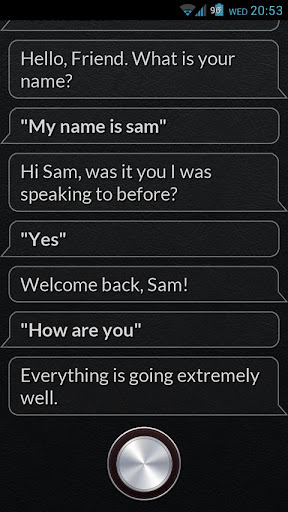
    Alex can chat to you, perform tasks for you and update your social profiles.

    This is the donation, ad free version of Alex which will get exclusive product features in the future.

    Look out for the next version which will include finding local businesses!

    With the Pro version of Alex, you can also enable and disable various settings, try saying "Turn on WiFi"

    Some examples of what to say to Alex:


    • "Call John", 
    • "Text Claire saying 'Hi there!'"
    • "Facebook 'I love Alex'"
    • "Tweet 'I love Alex'"
    • "Read messages"
    • "Search YouTube for 'Fenton'"
    • "Set alarm for quarter past 6"
    • "Remind me to pick up the shopping tomorrow at 6 o'clock"
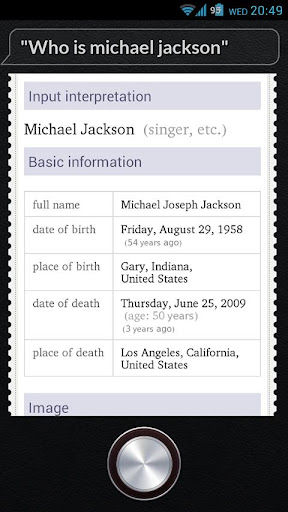
    • "Who is Michael Jackson?"
    • "What is 12 times 6"
    • "What is the weather in London?"
    • "Open Camera"
    • "Play Angry Birds"
    • "Switch on Bluetooth"
    • To see this list in the app, just ask "What can you do?"


    Alex uses the built in voice recognition service for your android devices. As the settings of these can change, please say "Calibrate" to calibrate the sensitivity and sound effects for your device.

    What's in this version : (Updated : Jan 21, 2013)

    • Fixed FC's with asking questions

    Required Android O/S : 2.3.3+

    Download Link: Click Here


    Bag It! 2.7(FULL) APK Armv6


    HOURS OF FUN & ADDICTIVE GAMEPLAY 
    ✔ 75+ unique levels! Try to get 3 stars and both medals for each - master them all! 
    ✔ Standard, Rampage, and Puzzle modes! 
    ✔ Seedy's Booty - an all new matching challenge mode! Collect coins, buy power-ups, and see if you can best your Facebook friends! 
    ✔ 3 endless modes - Ultimate Bagger, Endless Rampage, and Power Surge! 
    ✔ Over 25 achievements to earn!

    Requires Android:2.1 and Up

    Version: 2.7

    Download Links: (Armv6 and Armv7)
    TusFiles:
    BAG IT APK(QVGA,HVGA,WVGA,Tab) 

    DataFileHost:
    BAG IT APK(QVGA,HVGA,WVGA,Tab)

    ZippyShare:
    BAG IT APK(QVGA,HVGA,WVGA,Tab) 

    Install APK and Play.

    Dude Perfect 1.4 Armv6 APK


    Dude Perfect Game is simple but really nice,it looks simple but it is very tough to play,all levels are challenging and hard,you will have to throw the ball into the basket but before ball goes in to the basket you must get some Score to get the level pass,game is awesome and time killing...it is a 2D game but it will give you fun more than any 3D Game.......

    What's in this version:
    * Added Exit Button to main menu & Back Button support
    Thanks for making this the #1 SPORTS GAME on Android!
    If you're enjoying the game, please let us know by rating it 5 STARS! We're committed to making this a true 5 STAR experience for everyone! - Dude Perfect

    Requires Android: 2.2

    Version: 1.4

    Download Links: (Armv6 and Armv7)
    Tusfiles:
    Dude Perfect APK(QVGA,HVGA,WVGA,Tab)

    DataFileHost:
    Dude Perfect APK(QVGA,HVGA,WVGA,Tab)

    Install apk and play.

    Stargate Command Armv6 APK+Data Files


        Stargate Command AKA Tealc's Revenge released in the market with freemium TAG.

    The game features console quality graphics with an intuitive touch control system for ANDROID devices. With infinite ranks, Teal’c gets stronger and faster with each and every kill.

    Version: 1.2.1

     Requires Android: 2.2 and Up

    Download Links: (Armv6 - Armv7)
    Download APK File:
    TusFiles: 
    StarGate Command APK(QVGA,HVGA,WVGA,Tab)

    DataFileHost:
    StarGate Command APK(QVGA,HVGA,WVGA,Tab)

    ZippyShare:
    StarGate Command APK(QVGA,HVGA,WVGA,Tab)

    Download Data Files:
    TusFiles:
    STARGATE COMMAND DATA FILES

    DataFilehost:
    STARGATE COMMAND DATA FILES

    ZippyShare:
    STARGATE COMMAND DATA FILES

    DATAFILEHOST: (OPTIONAL)
    STARGATE COMMAND DATA FILES(Place it in Android/data/) if needed/
    And place this folder in Android/obb/ STARGATE COMMAND OBB FILES 

    Armv6 By JD
    Install APK And place data folder named com.arkalisinteractive.sgapp in SDCard/Android/Obb/ and play.
    If you get error like YOU MAY HAVE TO PURCHASED THIS APP, then watch this video.
    SOLUTION FOR THE ERROR YOU MAY HAVE NOT PURCHASED APP

    Saturday, 26 January 2013

    Team Dragon Armv6 APK + Fully Unlocked


         From the developers of FIGHT GAME HEROES brings you new fighting game TEAM DRAGON.

    Using Titanium Backup File you can unlock All the Things.

    Requires Android: 2.3 and Up

    Download Links: (Armv6 and Armv7)
    TusFiles:
    TEAM DRAGON APK(QVGA,HVGA,WVGA,Tab)

    DataFileHost:
    TEAM DRAGON APK(QVGA,HVGA,WVGA,Tab)

    TEAM DRAGON FULL UNLOCK:
    TEAM DRAGON TITANIUM BACKUP FILE

    Using TITANIUM BACKUP Restore Data Only

    Install APK and Play.
    Armv6 by UNKNOWN

    Eternity Warriors 2 APK 2.1.0 Unlimited Glu Coins(No Root)


    Eternity Warriors 2 2.1.0 APK Including Unlimited Glu Coins and Silver Coins.

    Version: 2.1.0

    Requires Android: 2.1 and Up

    Download Links: (Armv7 Only)
    DataFileHost:
    ETERNITY WARRIORS APK(Modded)

    2Shared:
    ETERNITY WARRIORS APK(Modded)

    Install APK and Play.

    Temple Run 2 1.0.1 APK Armv6


    Temple Run 2 Version 1.0.1 APK for Armv6 and Armv7 Phones.

    What's in this version:
    Added support for the device back button.

    Requires Android: 2.1 and Up

    Version: 1.0.1

    Download Links: (Armv6 and Armv7)
    Tusfiles(Direct Download)
    TEMPLE RUN 2 APK(QVGA,HVGA,WVGA,Tab)

    DataFileHost:
    TEMPLE RUN 2 APK(QVGA,HVGA,WVGA,Tab)

    ZippyShare:
    TEMPLE RUN 2 APK(QVGA,HVGA,WVGA,Tab)

    Install APK and Play.

    Temple Run 2 Armv6 APK


    FEATURES
    ★ Beautiful new graphics
    ★ Gorgeous new organic environments
    ★ New obstacles
    ★ More powerups
    ★ More achievements
    ★ Special powers for each character
    ★ Bigger monkey!!!

    Requires Android: 2.1 and Up

    Version: 1.0.1

    Download Links: (Armv6 and Armv7)
    Tusfiles(Direct Download)
    TEMPLE RUN 2 APK(QVGA,HVGA,WVGA,Tab)

    DataFileHost:
    TEMPLE RUN 2 APK(QVGA,HVGA,WVGA,Tab)

    ZippyShare:
    TEMPLE RUN 2 APK(QVGA,HVGA,WVGA,Tab)

    Install APK and Play.

    Temple Run 2 APK v1.0.1


    FEATURES
    ★ Beautiful new graphics
    ★ Gorgeous new organic environments
    ★ New obstacles
    ★ More powerups
    ★ More achievements
    ★ Special powers for each character
    ★ Bigger monkey!!!

    Requires Android: 2.1 and Up

    Version: 1.0.1

    Download Links: (Armv7)
    Tusfiles(Direct Download)
    TEMPLE RUN 2 APK(QVGA,HVGA,WVGA,Tab)

    DataFileHost:
    TEMPLE RUN 2 APK(QVGA,HVGA,WVGA,Tab)

    ZippyShare:
    TEMPLE RUN 2 APK(QVGA,HVGA,WVGA,Tab)

    Install APK and Play.

    Twitter Delicious Facebook Digg Stumbleupon Favorites More